What's new in RobotWorks 6.5
RobotWorks 6.5 is built on top of RobotWorks 6. It uses the same file
structure and will load files and paths made with RobotWorks 6, 5 &
4 without additional action.
However, files SAVED with RobotWorks 6.5 can not be loaded correctly
in previous versions, since RobotWorks 6.5 adds new functionality to
the
files.
RobotWorks 6.5 contains many enhancements and fixes, as well as
additional
functionality asked by RobotWorks users. Robot files .RB6
contain additional functionality which is not found in previous
versions.
Following are RobotWorks 6.5 main new features (not in any particular
order or importance). Understanding "what's new" requires some
prior knowledge of RobotWorks from previous versions.
1. Robot Preview
|
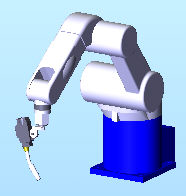
When you click a new robot in the list, a general figure of the robot
will show at point 1.
It will be green if the robot you clicked can reach point 1,
otherwise
it will show in red.
This will show even if there is no robot in the assembly, or the
robot
in the assembly is completely different.
The figure represents the robot in its "typical" posture (as
shown in the robot brochures). The robot model will be inserted in ZERO
posture (all links are at their zero value), which might differ from
the
"published" posture. |
 |
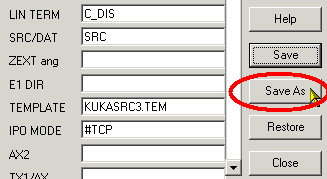
2. Save-AS Robot Options
|
RobotWorks 6.5 allows you to save different Robot
Options files.
Unlike in RobotWorks 6, where you could use different robot options
file but could not create them. you can now create specific files
yourself.
|
 |
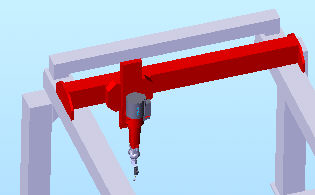
3. Gantry (portal) robot
|
Support for Gantry robots was
added to RobotWorks 6.5.
In such robots the arm is mounted on XYZ linear slides but 3 more
links
can rotate, thus keep 6 DOF.
|
 |
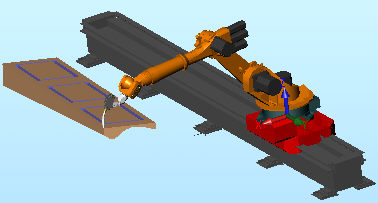
4. Linear Axis
|
RobotWorks 6.5 enhanced the functionality of a
robot moving on a linear axis far beyond RobotWorks 6.
Several motion modes are
supported, from manual (telling
the robot slide where to be at each point) to automatic
(in which the program calculates the appropriate slide position based
on the robot reach.
RobotWorks writes the slide data into the robot file for most robot
makes.
|
 |
5. DENSO & REIS
support
|
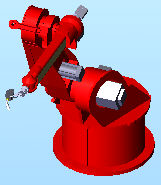
RobotWorks 6.5 introduces support for two more robot companies - REIS and DENSO.
Currently limited families of products from both manufacturers are
supported.
Contact support for details. |
  |
6. Text BEFORE LINE
in EVENTS
|
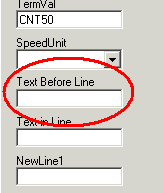
A new option was added to Event
Forms
of all supporting robots, where text (e.g. command, numeric parameter
etc.) can be added BEFORE the point.
This is required for some controllers as well as the ability to start
a process (e.g. "ARC ON") before the first move.
|
 |
7. Takeoff & Landing MOTION ONLY points
|
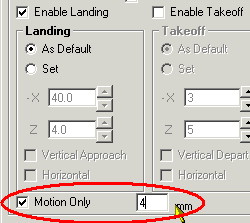
You can now add Motion Only points
during Landing & Takeoff.
This could be used for:
- Enhancing the motion simulation (the robot will gradually approach
teh first lead point)
- Adding Process
point along the landing / takeoff motion
|
 |
8. Motion Indicator
|
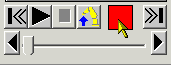
You can now see directly in the main RobotWorks form what status the
motion has - green / red / yellow, without opening the robot setup
form.
|
 |
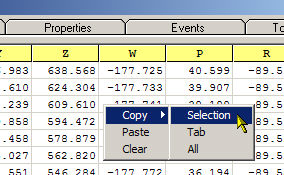
9. Copy CONVERT information to Windows Clipboard
|
The Convert grid now allows
copying portions of the displayed data to Windows Clipboard.
This is useful for integrators who use the numeric data for their own
applications. |
 |
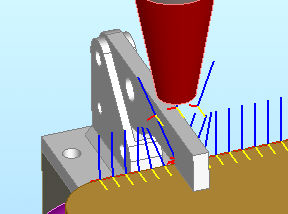
10. Bypass Obstacles
|
Developed for arc welding applications, this function provides easy
way to "jump above" obstacles in the middle of lead, such as
clamps, ribs etc.
|
 |
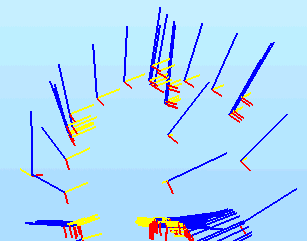
11. Smooth Lead
|
Imported or captured points sometimes suffer form uneven pitch and
orientation
due to the instable hand.
Now such path can be smoothed using a new function.
|
 |
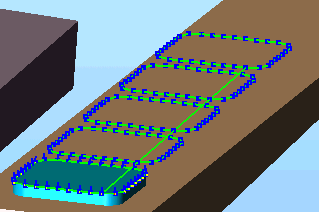
12. Step & Repeat relations and Events
|
You can now define Step & Repeat
for leads using different references, such as World,
User-defined FRAME, etc.
This is very useful for creating identical parts from path on one.
You an also use Events
within the original lead, and they will be copied
as well to the other repeats.
|
 |
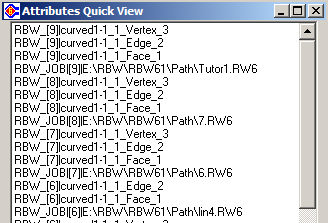
13. View SolidWorks Attributes
|
Jobs saved in RobotWorks keep pointers inside the SolidWorks
assembly.
Called Attributes, they are
hidden
from SolidWorks users.
A new form gives you a list of all the pointers inside an assembly so
you can see which jobs can be used with this assembly, as well as which
entities were included with a job.
|
 |
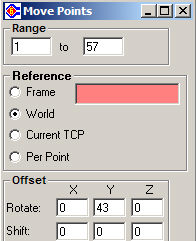
14. Move Points
|
Several functions enable you to move
points one by one using the tool as reference.
This new function enables moving groups
of points from their current location, and re position them
anywhere
with different reference, such as world,
Frame etc.
|
 |
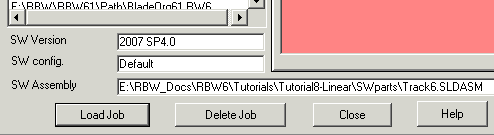
14. SolidWorks information in jobs
|
In addition to details about RobotWorks job,
you can now get an idea about the SolidWorks version
and assembly Configuration when
the job was saved.
|
 |
15. Multi-Tool support
RobotWorks has better support for more than one tool in T mode.
16. Import Feed Rate and RAPID moves in 5-axes CNC jobs
We now import feed information from CNC files.
17. New Program Parameters
New program properties were added.
18. FRAME change on SPACE moves
Space moves to and from a POSE or to Landing points etc. can be
included
in user-define FRAME with different options.
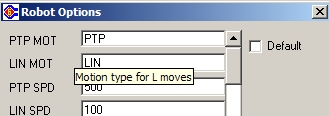
19. TOOL TIP help in Robot Options
|
When you move the mouse pointer over the Robot
Options form, a short explanation of that field will appear
under
the mouse pointer.
The text can be edited.
|
 |
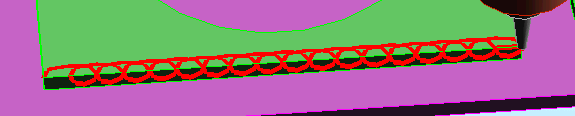
20. Periodic Path
This new function enables forming periodic
(repeating) design of
points
along existing leads. It is
mostly
useful for arc welding, but can be used in any application, such as
decorating,
dispensing etc.
In addition to the above major changes, numerous changes and fixes
are
included in this release.
December 2009